
You just moved into a new apartment. You want smart lights, a smart plug for the coffee maker, maybe a smart speaker.
Then you start reading setup guides, and every other recommendation tells you to buy a hub. A bridge.
A gateway. Another small box that needs an outlet, an Ethernet cable, and a spot on your already crowded shelf.
For renters and small apartment residents, that extra hardware is more than an inconvenience. It is another thing to set up, another app to manage, and another device to pack when your lease ends.
The good news is that a growing number of smart home devices without a hub work perfectly well on their own. You can build a genuinely useful smart home using nothing more than your existing Wi-Fi router and your phone.
But there is a catch. Going hub-free comes with real trade-offs that most buying guides gloss over.
Wi-Fi congestion, shorter battery life on sensors, and reliability issues can sneak up on you once you pass a certain number of devices.
This guide covers which smart home devices work without a hub, how they connect, what you sacrifice by skipping the hub, and when a small hub might save you money and frustration in the long run.
Quick Answer
Many popular smart home devices do not require a separate hub. Wi-Fi-based smart plugs, smart bulbs, smart speakers, smart cameras, and smart thermostats connect directly to your home Wi-Fi network.
Bluetooth devices pair straight to your phone. Newer Matter-over-Thread devices use a built-in Thread border router, which is found in many modern smart speakers and Wi-Fi routers.
The trade-off is that every Wi-Fi device competes for bandwidth on your router, which can slow down your network in a small apartment with many connected gadgets.
What a Hub Actually Does (and Why Some Devices Need One)
To know which smart home devices without a hub will work for you, it helps to understand what a hub does in the first place.
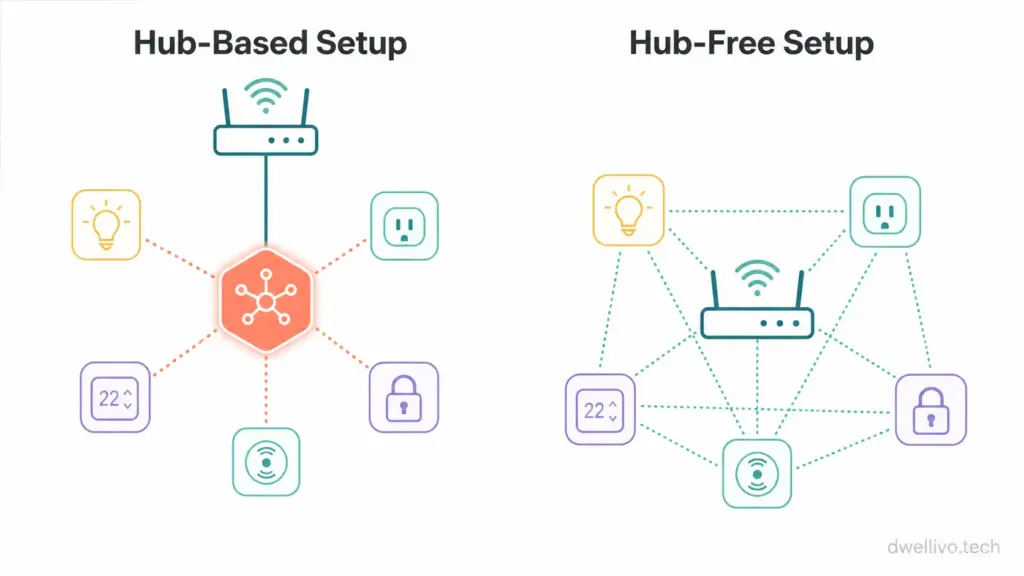
A smart home hub is a small device that acts as a translator and traffic controller. It speaks the wireless language your smart devices use (often Zigbee or Z-Wave) and translates that into something your Wi-Fi network and phone can understand.
Think of it like a multilingual interpreter at a conference. Your smart bulb speaks Zigbee. Your phone speaks Wi-Fi. The hub sits in the middle and makes sure they understand each other.
Hubs also manage local communication between devices. When you set up an automation like “turn off the lights when the motion sensor detects no movement,” a hub can process that command locally without sending the signal to a cloud server and back. This makes automations faster and more reliable, even if your internet goes down.
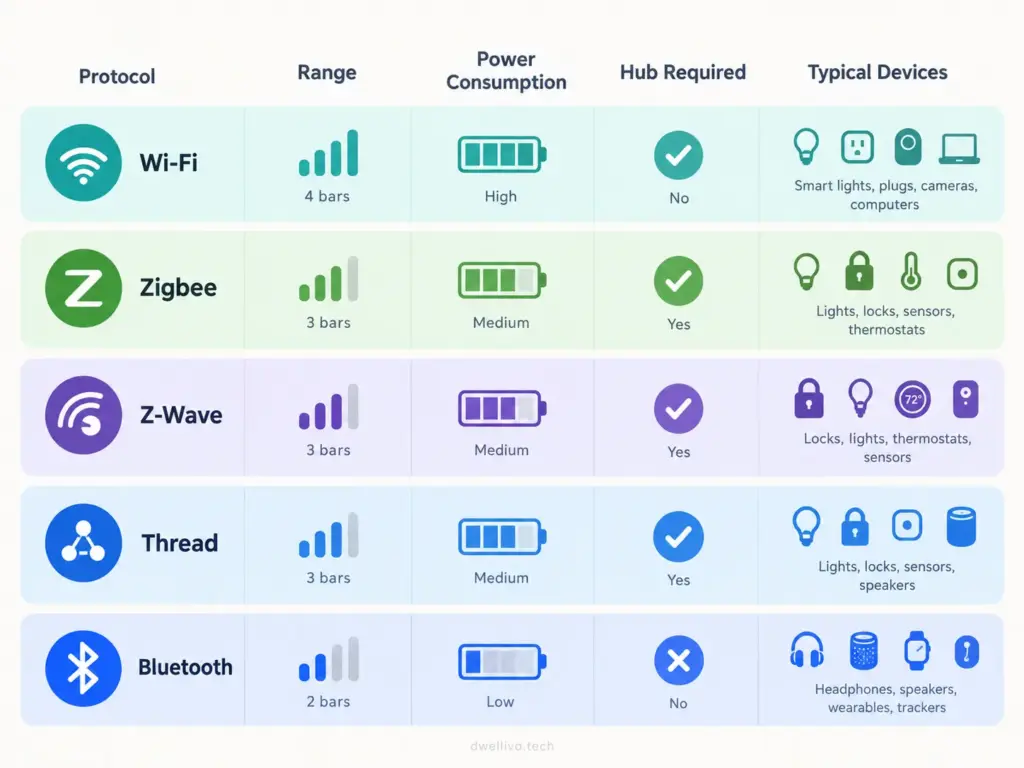
The main wireless protocols that traditionally require a hub include:
- Zigbee: Used by many Philips Hue bulbs, Samsung SmartThings sensors, and IKEA Tradfri devices. Requires a Zigbee hub or bridge.
- Z-Wave: Common in smart locks and security sensors. Requires a Z-Wave hub.
- Thread: A newer mesh protocol that requires a Thread border router (though many modern devices already have one built in).
Devices that use Wi-Fi or Bluetooth do not need a separate hub because your router or phone already handles the communication.
The “Hidden Hub” Reality: Your Router Is Doing the Work
Here is something most hub-free buying guides overlook: buying a Wi-Fi-enabled smart plug or smart bulb does not eliminate the need for a hub. It just shifts the hub’s job onto your Wi-Fi router.
Every Wi-Fi smart device connects to your router the same way your laptop and phone do. Your router assigns each device an IP address, manages the data traffic, and keeps the connection stable.
A typical consumer Wi-Fi router can handle somewhere between 20 and 50 connected devices before performance starts to degrade, depending on the router’s quality and your internet plan.
In a small apartment, this matters more than you might think. You already have a phone, a laptop, a tablet, a streaming stick, and maybe a smart TV connected to your network.
Add ten Wi-Fi smart bulbs, three smart plugs, a smart speaker, and a security camera, and you are approaching the limit of what a basic ISP-provided router can handle comfortably.
From Dwellivo’s perspective, this is the single most important thing to understand about smart home devices without a hub: the “hub-free” label is marketing shorthand.
The hub function still exists; your router is just doing the heavy lifting instead of a dedicated device.
Hub-Free Device Categories That Actually Work Well
Not all hub-free devices are created equal. Some categories work beautifully without a hub, while others can create headaches once you scale up. Here is a practical breakdown.
Smart Plugs
Wi-Fi smart plugs are the easiest entry point into a hub-free smart home. Brands like TP-Link Kasa, Wyze, and Amazon Smart Plug connect directly to your 2.4 GHz Wi-Fi network and respond to app commands or voice assistants within seconds.
For renters, smart plugs are ideal because they require zero installation. You plug them into an existing outlet, connect them to your Wi-Fi through the companion app, and you are done. No drilling, no wiring, no landlord permission needed.
The main limitation is that most Wi-Fi smart plugs only work on 2.4 GHz networks. If your router broadcasts a combined 2.4 GHz and 5 GHz network under a single name, you may need to temporarily separate the bands during setup. Our guide to apartment Wi-Fi setup covers this process in more detail.
Smart Bulbs
Wi-Fi smart bulbs from brands like Wyze, Sengled (Wi-Fi models), and LIFX connect directly to your network without a bridge. They offer color changing, dimming, and scheduling through their companion apps.
The trade-off compared to hub-based bulbs like Philips Hue is that Wi-Fi bulbs tend to be slightly slower to respond in groups. If you have six Wi-Fi bulbs in a living room and tell them all to turn off at once, you may notice a slight stagger as your router processes each command individually. A Zigbee hub handles group commands more efficiently because it uses a mesh network designed for this kind of local device communication.
For a small apartment with a handful of bulbs, this delay is barely noticeable. For a larger setup, it can become annoying.
Smart Speakers and Displays
Amazon Echo, Google Nest, and Apple HomePod devices connect via Wi-Fi and serve as both smart speakers and voice control centers. They do not need a hub to function, though many newer models contain built-in Zigbee or Thread radios that can act as hubs for other devices.
This is an important detail. If you own a fourth-generation Amazon Echo or an Apple HomePod Mini, you may already have a hub without realizing it. These devices can control Zigbee and Thread accessories directly, which means you can add certain sensors and bulbs without buying a separate hub.
Smart Cameras and Video Doorbells
Most consumer smart cameras, including Wyze Cam, Blink, Ring, and Eufy models, connect over Wi-Fi. Some battery-powered models use a small sync module (like Blink’s Sync Module), which functions as a mini hub for battery management, but the sync module connects to your Wi-Fi and does not require Ethernet or a separate smart home platform.
For renters, Wi-Fi cameras are the most practical option because they mount with adhesive strips or small screws and can be removed without significant damage to walls.
Smart Thermostats
Wi-Fi smart thermostats like the Amazon Smart Thermostat, Ecobee, and Google Nest Thermostat connect directly to your home network. They do not need a hub.
The important caveat here is that smart thermostats require a C-wire (common wire) for continuous power in most cases. Many older apartments do not have a C-wire behind the thermostat plate. Before buying a smart thermostat, check your existing wiring. If you are renting, get your landlord’s approval before modifying any HVAC wiring.
Smart Locks
This is where the hub question gets complicated. Many smart locks use Bluetooth for direct phone control, which works fine when you are standing near the door. But if you want remote access (locking the door from work, for example), most Bluetooth locks require a Wi-Fi bridge or hub to connect to the internet.
Some newer models, like the Schlage Encode and certain Yale Assure Lock configurations, have built-in Wi-Fi and do not need a separate bridge. These are the best options for renters who want remote lock control without extra hardware. Just keep in mind that Wi-Fi smart locks tend to drain batteries faster than their Z-Wave or Thread counterparts because Wi-Fi requires more power to maintain a constant connection.
The Real Trade-Offs of Going Hub-Free
Choosing smart home devices without a hub is a perfectly valid strategy, especially for beginners and renters. But it is important to understand what you are trading away.
Wi-Fi Network Congestion
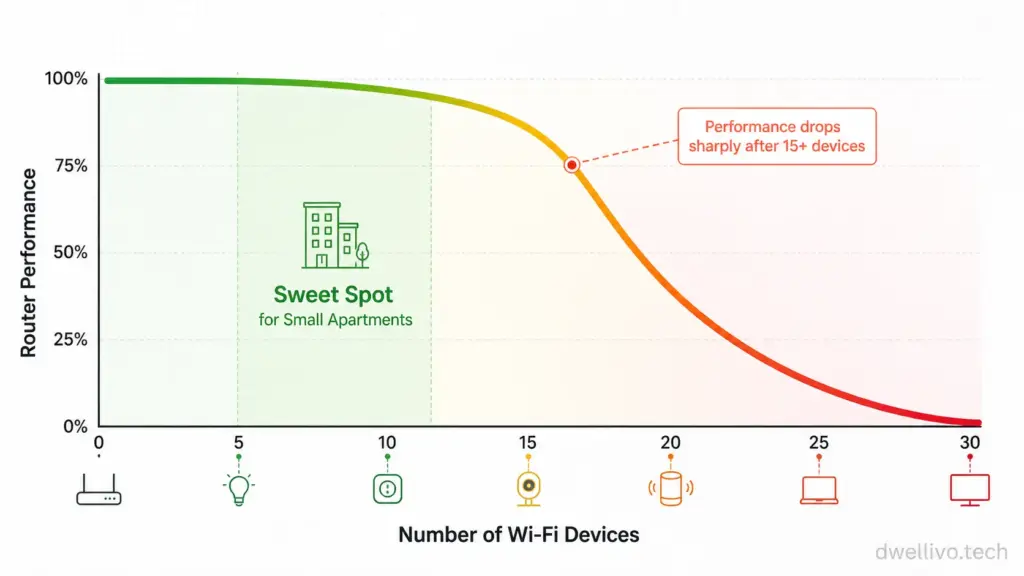
Every Wi-Fi smart device adds traffic to your network. In a small apartment with a basic router, adding 15 or 20 Wi-Fi devices can noticeably slow down your internet speed for streaming, video calls, and gaming. If you notice your Netflix buffering more often after adding a batch of smart plugs, network congestion is the likely culprit.
Battery Life on Sensors
Wi-Fi is a power-hungry protocol compared to Zigbee, Z-Wave, or Thread. Battery-powered sensors that use Wi-Fi (like some Wi-Fi door and window sensors) will drain their batteries much faster than their Zigbee counterparts. A Zigbee motion sensor might last two years on a single coin cell battery. A Wi-Fi version of the same sensor might last three to six months.
Reliability During Internet Outages
Most Wi-Fi smart devices rely on cloud servers to process commands. If your internet goes down, your smart plugs and bulbs may stop responding to app commands and automations. A local hub can keep automations running even without an active internet connection because it processes commands within your home network.
Device Response Speed
Hub-based Zigbee and Z-Wave devices typically respond faster than Wi-Fi devices because the communication path is shorter. The signal goes from the device to the hub to your phone, all within your local network. Wi-Fi devices often route commands through a cloud server, adding a fraction of a second of latency that can feel sluggish when you are flipping a light switch.
Privacy and Security Considerations for Hub-Free Setups
One overlooked aspect of hub-free smart homes is the security footprint. Every Wi-Fi device you add is a direct entry point into your home network. A hub-based setup creates a layer of separation: your Zigbee sensors talk to the hub, and only the hub talks to your Wi-Fi network. With hub-free devices, each smart plug and bulb sits on the same network as your laptop and phone.
The Federal Trade Commission recommends keeping all smart devices updated with the latest firmware, using strong unique passwords for each device account, and enabling two-factor authentication wherever available. If your router supports a guest network, consider placing your smart home devices on that separate network to isolate them from your personal devices.
This is not a reason to avoid hub-free devices entirely. It is a reason to be intentional about your network setup as your smart home grows.
When a Hub Actually Makes Sense (Even for Renters)
From Dwellivo’s editorial view, going hub-free is the right choice for most people starting with three to eight smart devices in a small apartment. But there are specific situations where a small, inexpensive hub will improve your experience.
Consider adding a hub if:
- You plan to use more than 10 to 15 smart devices, and your router is a basic model provided by your ISP.
- You want to use battery-powered sensors (motion, door, window, temperature) and do not want to replace batteries every few months.
- You want your automations to keep working during internet outages.
- You already own a smart speaker with a built-in Zigbee or Thread radio (like a fourth-gen Echo or HomePod Mini) and can use it as a free hub.
A hub does not have to be a large, expensive piece of equipment. The Amazon Echo (fourth generation) doubles as a Zigbee hub. The Apple HomePod Mini serves as a Thread border router. If you already own one of these, you may be able to add Zigbee or Thread devices without buying anything extra.
The Matter and Thread Factor: How the Rules Are Changing
The smart home industry is in the middle of a major shift that directly affects the hub conversation. The Matter standard, developed by the Connectivity Standards Alliance (CSA), is a universal communication protocol designed to let smart home devices from different brands work together. You can learn more about the standard on the CSA’s official Matter page.
Matter devices can communicate over Wi-Fi, Thread, or Ethernet. Matter-over-Wi-Fi devices do not need a hub. Matter-over-Thread devices need a Thread border router, but as mentioned earlier, many modern smart speakers and Wi-Fi routers already include one.
This means the traditional divide between “hub required” and “hub-free” is becoming less clear. A Thread border router is technically a hub, but it is often built into a device you already own. The Thread Group maintains a list of certified Thread border routers if you want to check whether your existing devices qualify.
From a renter’s point of view, the practical takeaway is this: if you are buying new smart home devices today, look for the Matter logo. Matter-certified devices are more likely to work across platforms (Apple Home, Google Home, Amazon Alexa) without locking you into a single ecosystem or requiring a brand-specific hub. This flexibility is especially valuable for renters who may switch between ecosystems as their living situation changes.
A Practical Hub-Free Setup for a Small Apartment
Imagine you are moving into a one-bedroom apartment and want a basic smart home setup without buying any extra hardware. Here is a practical starting point using only Wi-Fi and Bluetooth devices.
Living Room:
- Two Wi-Fi smart bulbs in your main lamps (Wyze or Sengled Wi-Fi models)
- One Wi-Fi smart plug for a floor lamp or fan
- One smart speaker (Amazon Echo Dot or Google Nest Mini) for voice control
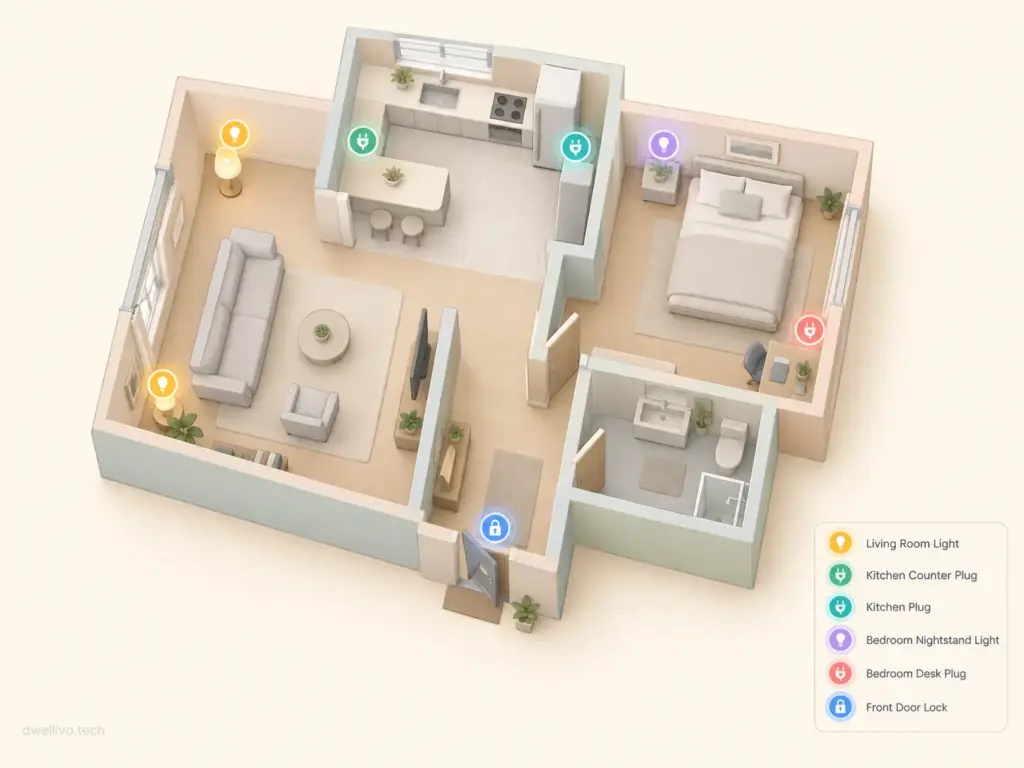
Bedroom:
- One Wi-Fi smart bulb in the bedside lamp
- One Wi-Fi smart plug for a phone charger or white noise machine
Kitchen:
- One Wi-Fi smart plug for the coffee maker
Entry:
- One Wi-Fi smart lock with built-in Wi-Fi (Schlage Encode or similar)
This setup gives you voice-controlled lighting, scheduled automations for the coffee maker, and remote lock access. Total smart devices on your Wi-Fi network: about seven, plus your phone, laptop, and streaming stick. A standard router handles this easily.
Total estimated cost for this setup ranges from $100 to $200, depending on the brands you choose. No hub, no bridge, no extra wiring.
As your setup grows beyond 12 to 15 devices, revisit the hub question. At that point, a small hub or an upgrade to a better Wi-Fi router (or a mesh Wi-Fi system) will help keep everything running smoothly. Our guide to choosing a mesh Wi-Fi system for apartments can help you evaluate that upgrade when the time comes.
Frequently Asked Questions
Do smart plugs need a hub?
Most smart plugs use Wi-Fi and do not need a hub. They connect directly to your 2.4 GHz Wi-Fi network. Some Zigbee-based smart plugs (like certain IKEA Tradfri models) do require a compatible hub or bridge.
Can I use smart bulbs without a hub?
Yes. Wi-Fi smart bulbs from brands like Wyze, LIFX, and Sengled connect directly to your router. Zigbee-based bulbs like Philips Hue require a Hue Bridge or a compatible Zigbee hub for full functionality.
Do I need a hub for Alexa or Google Home?
No. Alexa and Google Home devices connect via Wi-Fi. However, some Echo and Nest devices contain built-in Zigbee or Thread radios that can serve as hubs for other compatible devices.
Will hub-free smart home devices work without internet?
Most Wi-Fi smart devices require an active internet connection for app control and voice commands because they rely on cloud servers. Some devices retain basic local functionality (like physical switch control) during outages, but remote access and most automations will not work.
Is a hub-free smart home less secure?
Not necessarily, but Wi-Fi devices do present a larger attack surface because each device connects directly to your network. The FTC recommends keeping all smart devices updated, using strong unique passwords, and placing smart home devices on a separate Wi-Fi network when your router supports it.
Final Takeaway
Building a smart home without a hub is not only possible but also the most practical approach for most renters, small apartment residents, and first-time smart home users.
Wi-Fi-based smart plugs, bulbs, cameras, speakers, and thermostats give you a wide range of functionality with nothing more than your existing router.
The key is to start small, monitor your Wi-Fi performance as you add devices, and understand that the “hub-free” label means your router is doing the hub’s job.
When your setup grows, or your needs become more advanced, a small hub or a router upgrade is a simple next step, not a complete overhaul.
For more practical smart home advice tailored to renters and small spaces, explore our full Smart Home category or check out our beginner’s guide to apartment smart home setup.
1 thought on “Smart Home Devices Without a Hub: 7 Proven Picks That Work”