
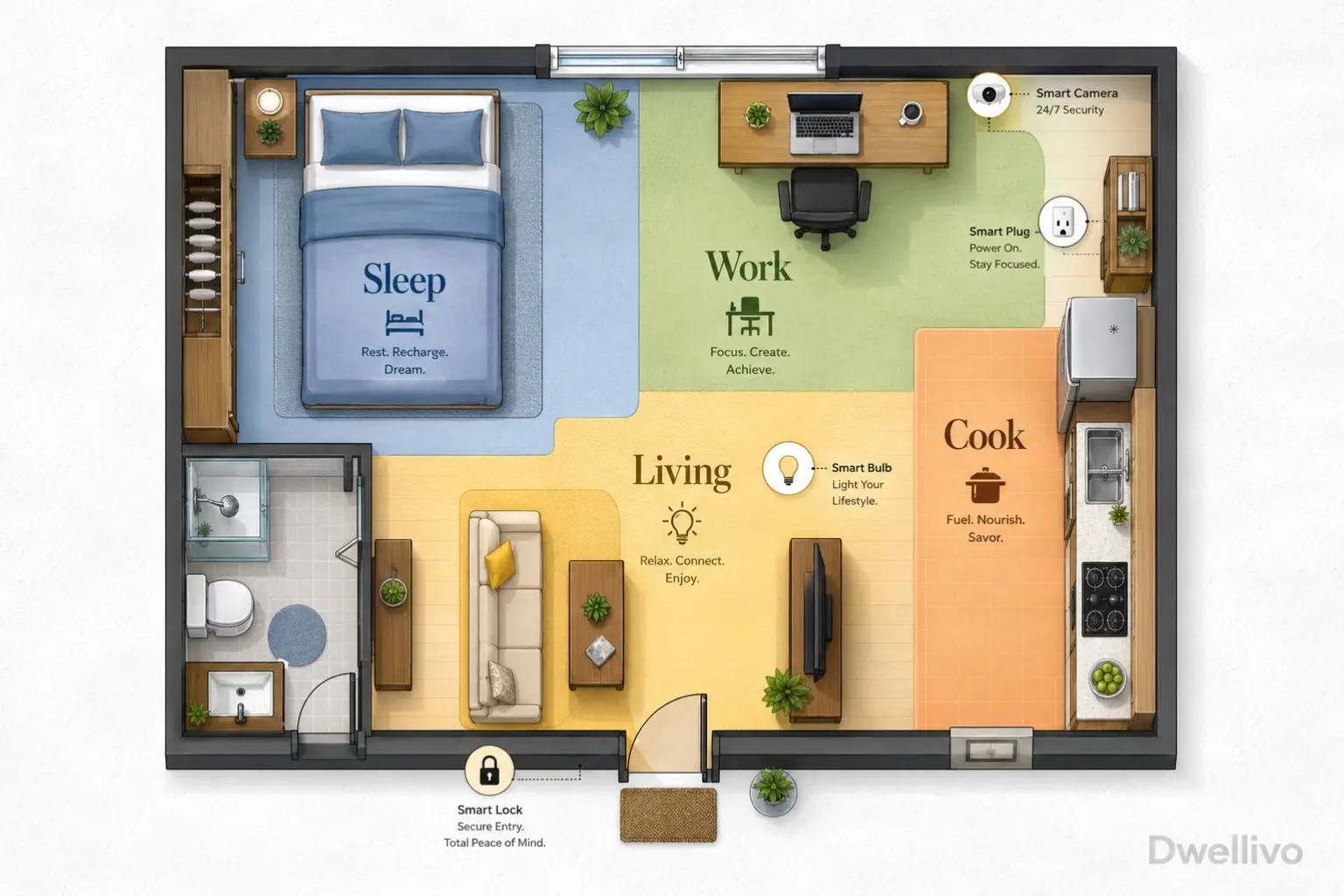
A studio apartment breaks most smart home advice before you open the box.
Guides built for houses assume a hallway thermostat, a separate bedroom, a garage for a hub closet, and a landlord who doesn’t care if you drill into a door frame.
None of that applies when your kitchen, living room, and bedroom are the same 400 square feet.
The real challenge in a studio isn’t finding smart devices.
It’s finding ones that don’t clutter a single room or fight each other for the same wall outlet. They shouldn’t need permanent installation.
This guide covers ideas of smart home ideas for studio apartment built for that exact constraint: one room, one lease, and walls you can’t touch.
Table of Contents
Quick Answer
For a studio, prioritize devices that solve overlap problems. Use lighting to separate a “sleep zone” from a “living zone” without a wall between them.
Choose plug-in automation instead of wired switches. Stick to one voice hub instead of three competing ones. Skip anything that needs drilling, rewiring, or a dedicated equipment closet.
You don’t have one.
Why Studio Apartments Need a Different Approach
In a house, each room gets its own lighting scene, thermostat zone, and security sensor. In a studio, every device shares the same airspace.
A smart plug on your desk lamp is visible from your bed.
A motion sensor by the door will trigger every time you walk to the kitchen, not just when someone enters.
From Dwellivo’s perspective, the studio-specific problem isn’t a lack of smart home products. It’s that most buying guides don’t account for spatial overlap.
“Living room lighting” and “bedroom lighting” are often the same four bulbs. The ideas below are chosen because they solve that overlap instead of ignoring it.
1. Use Light Zones Instead of Light Rooms
Since you can’t separate rooms with walls, separate them with light. Assign different bulbs or lamps to functional zones.
Set up a “wake up” zone near your bed, a “focus” zone at your desk, and a “wind down” zone near your couch or reading chair. Control each one independently through a single app.
Color-tunable smart bulbs work well here. Wi-Fi or Matter-compatible screw-in bulbs from brands like Wyze, Govee, or Nanoleaf let you set warm, dim light near the bed and brighter, cooler light at a desk—no wiring required.
Group them into named scenes like “Morning,” “Work,” and “Wind Down” so one voice command or app tap changes the whole room’s mood.
2. Put Your Bedroom Lighting on Its Own Voice Group
Even in one room, you can create a virtual bedroom. Group only the lights near your bed into their own voice assistant group.
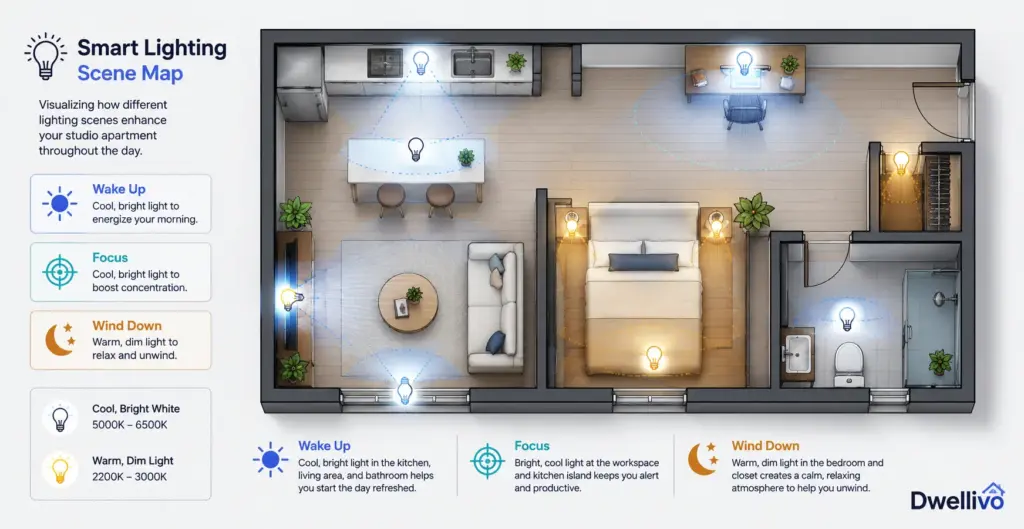
Say “turn off bedroom lights” and only those two lamps go dark, while your kitchen counter light or desk lamp stays on. This is a five-minute app setting, not a hardware purchase.
It’s the single most useful trick for studio lighting.
3. Choose a Smart Lock That Skips the Drill Entirely
Studio renters worry about door modifications more than almost anything else. The front door is the one fixture every landlord inspects closely.
Retrofit smart locks solve this problem by mounting over your existing interior thumb-turn with strong adhesive pads instead of screws. The exterior hardware and your original key stay completely untouched.
Devices in this category, such as the SwitchBot Lock Pro, attach to the inside of your current deadbolt and mechanically turn it for you. From the hallway, your door looks exactly as it did on move-in day.
Other retrofit options, like the August Wi-Fi Smart Lock, work similarly. They fit over the interior thumb-turn with a few small screws that leave no visible marks once removed.
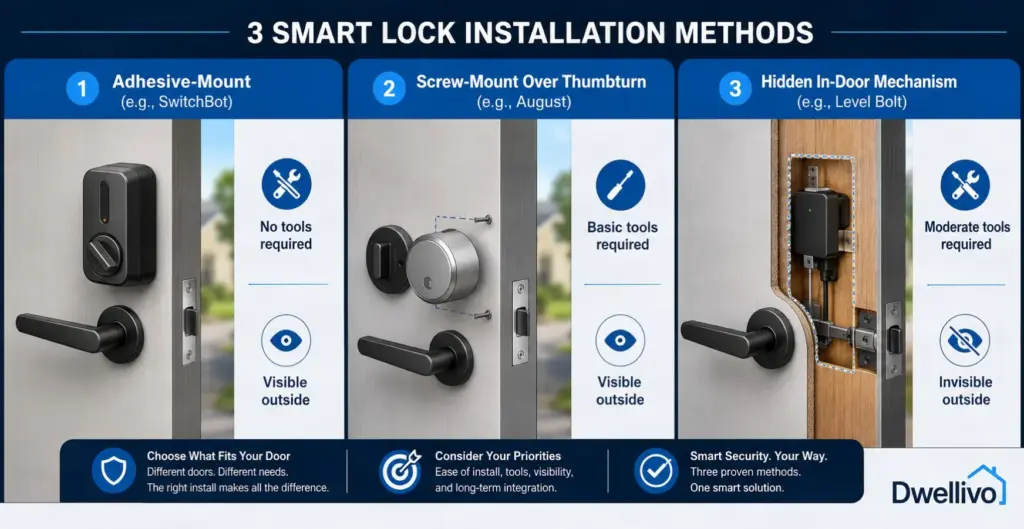
If your lease allows minor screw holes on interior hardware only, a hidden-mechanism option like the Level Bolt sits inside the door itself. Nothing shows on either side.
Renter note: Always photograph your original lock hardware before installing anything. Confirm with your landlord whether adhesive-only or screw-based retrofit locks are acceptable. Policies vary by building even when no drilling is involved.
4. Automate Your Only Overhead Light With a Smart Switch Cover
If your studio has one ceiling fixture controlled by a regular wall switch, you don’t need an electrician to make it smart.
Battery-powered switch add-ons, like the SwitchBot Bot, stick over your existing toggle or rocker switch. They physically flip it on command, and no rewiring is required.
This turns a single “dumb” overhead light into something you can schedule, voice-control, or trigger from your phone. That matters when it’s your only overhead light source in a studio.
5. Use Smart Plugs to Turn Any Lamp or Appliance Into a Zone Controller
Smart plugs are the single best value in a studio. A studio is really just a collection of lamps and small appliances plugged into a handful of outlets.
A basic Wi-Fi- or Matter-compatible smart plug from brands like TP-Link Kasa or Wyze turns any lamp, fan, or space heater into something schedulable and voice-controllable. Your building’s wiring stays untouched.
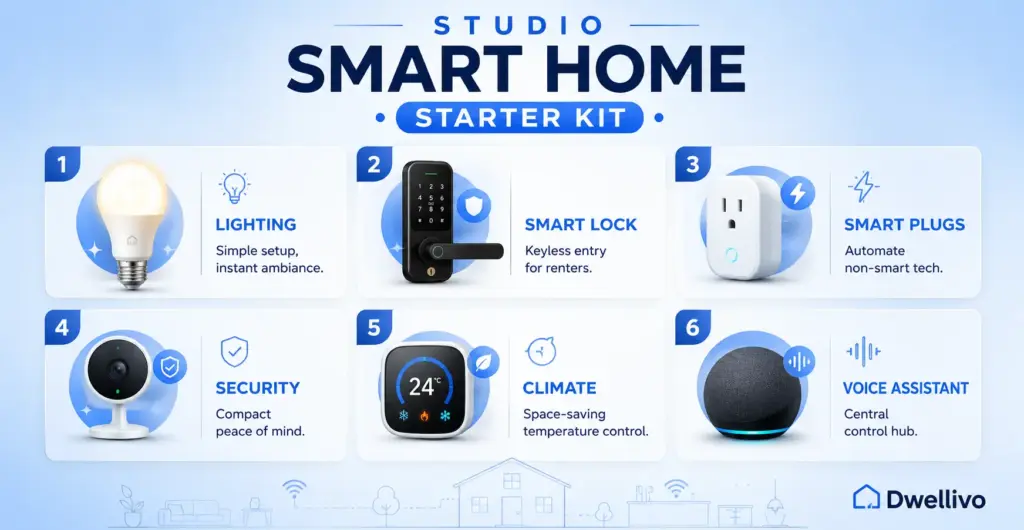
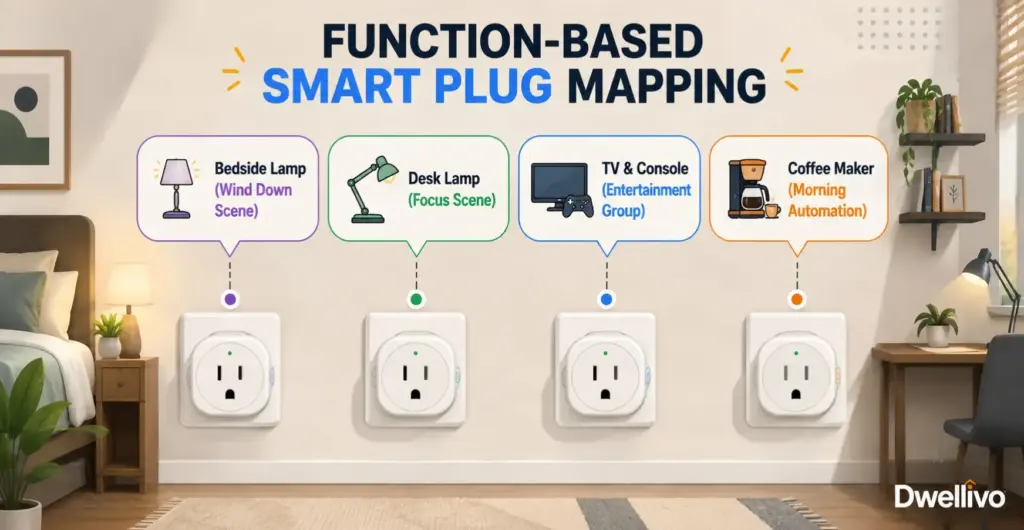
Buy four rather than one. Assign each to a specific function: bedside lamp, desk lamp, TV and console, and coffee maker.
Then build a morning routine that turns on your desk lamp and coffee maker at once, and a night routine that kills every light except your bedside lamp.
6. Build a “Studio Wake-Up” Routine That Replaces a Blackout Curtain Motor
Motorized curtains are popular in smart home content, but full curtain-rail motors are expensive. They often require rail replacement, which is a bad fit for a single-window studio on a lease.
A cheaper alternative works just as well: pair a smart plug with a sunrise-style smart bulb near your bed, scheduled to fade 20 minutes before your alarm.
You get a gentler wake-up effect without touching your existing curtain rod.
If you do want motorized curtains, look specifically for clip-on curtain robots, such as SwitchBot’s curtain device. These attach to an existing rod or track rather than replacing it.
This is the only curtain automation category genuinely suited to rentals.
7. Choose One Voice Hub, Not Three
Because a studio has no walls to separate rooms, you don’t need multiple voice assistant speakers the way a house does.
One compact smart speaker, centrally placed, covers the whole apartment. Adding a second or third speaker in a studio usually just creates competing wake-word responses.
That’s a real problem in small spaces, since both speakers can hear you and both may answer.
If you want a display for video calls, recipes, or camera feeds, a single smart display placed near your kitchen counter typically covers both cooking and general use better than a second speaker.
8. Monitor Air Quality and Humidity in One Compact Sensor
Studios often have worse airflow than multi-room apartments, especially units with a single window or a kitchen that shares air with the sleeping area.
A small Wi-Fi thermometer and humidity sensor, like a Govee or SwitchBot indoor sensor, gives you a real reading of your air quality when placed away from windows and appliances.
It can also trigger a smart plug-controlled fan or dehumidifier automatically when humidity climbs.
This matters more in a studio than a house. Cooking smells, shower steam, and sleeping all happen in overlapping air. A single sensor reading affects your whole living space at once.
9. Use a Portable Security Camera Instead of a Fixed One
A full home security system is overkill for one room, and most studio renters don’t need multi-zone coverage.
A single battery-powered indoor camera, such as a Wyze Cam, gives you the same peace of mind as a house-sized system when placed to cover your front door and main walking path.
It costs a fraction of the price and needs no wiring.
Look for models with local storage options or a low-cost cloud plan. A studio-sized camera plan shouldn’t cost as much as a multi-camera house subscription.
Keep the camera angled toward the door and away from your bed for privacy, and turn off motion recording during set “at home” hours if the app supports it.
10. Add a Door and Window Sensor for the One Entry Point You Actually Have
Most studios have exactly one door and one or two windows. That makes contact sensors far more effective than they are in houses with a dozen entry points.
Pair battery-powered door and window sensors with your smart plug or camera system. They can trigger a light to flash or a notification to fire the instant your door opens while you’re out.
You get real security awareness without a monitored alarm contract.
11. Skip the Robot Vacuum Dock, Not the Robot Vacuum
Full-size robot vacuum docking stations take up real floor space that a studio can’t spare, often as much as a small nightstand.
Compact models, or ones with self-emptying as an optional add-on, let you skip the bulky base station and empty the bin manually. You trade a little convenience for square footage you’ll actually notice back.
If you have the closet space, a slim under-shelf charging spot works better than a floor-standing tower in the middle of your one room.
12. Use Under-Cabinet or Under-Bed Lighting for Hidden Task Zones
Command-strip-mounted LED light bars add functional lighting exactly where you need it, whether that’s under a kitchen cabinet for cooking or under a bed frame for reading.
No new outlet or drilled hole required. Battery- or USB-powered strips with adhesive backing are the renter-safe version of built-in task lighting. Most connect to the same smart plug or Matter hub as your other lights.
13. Set a “Guest Mode” Scene for When Your Studio Doubles as a Living Room
Studios do double duty constantly. Your bed is ten feet from your couch, and when friends come over, your sleeping area is on full display.
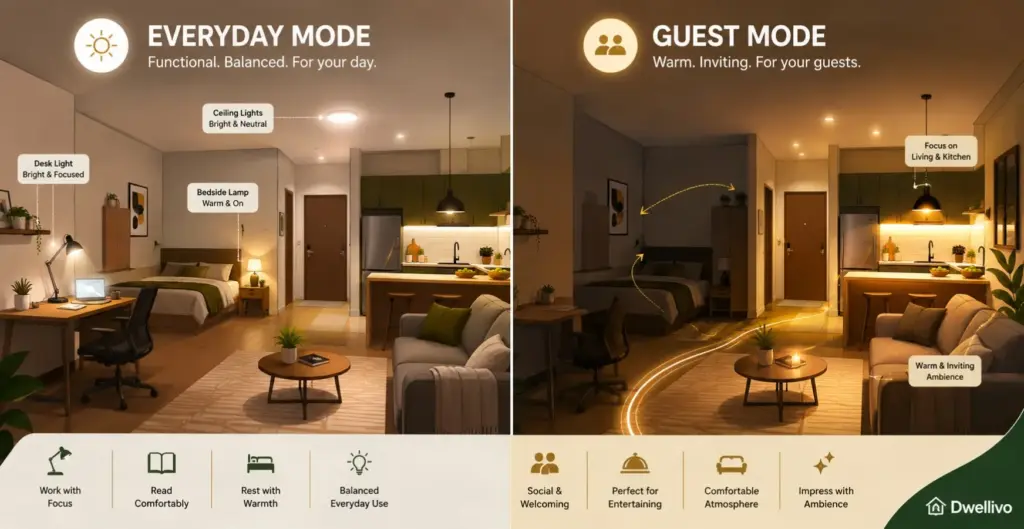
A dedicated “Guest Mode” voice scene can dim bedside lights, turn off any visible bedroom-specific devices, and brighten your living or seating zone.
It makes the space feel intentional rather than makeshift, without moving a single piece of furniture.
14. Choose Matter-Compatible Devices to Avoid an App Graveyard
A studio doesn’t have room for a drawer full of manufacturer-specific hubs. Devices certified under the Matter smart home standard work across Apple Home, Google Home, Amazon Alexa, and Samsung SmartThings without needing a separate app or bridge for each brand.
They also communicate over your local network rather than routing everything through the cloud. When shopping, prioritize the Matter logo on new purchases so your entire studio stays controllable from a single app, even if you switch voice assistants later.
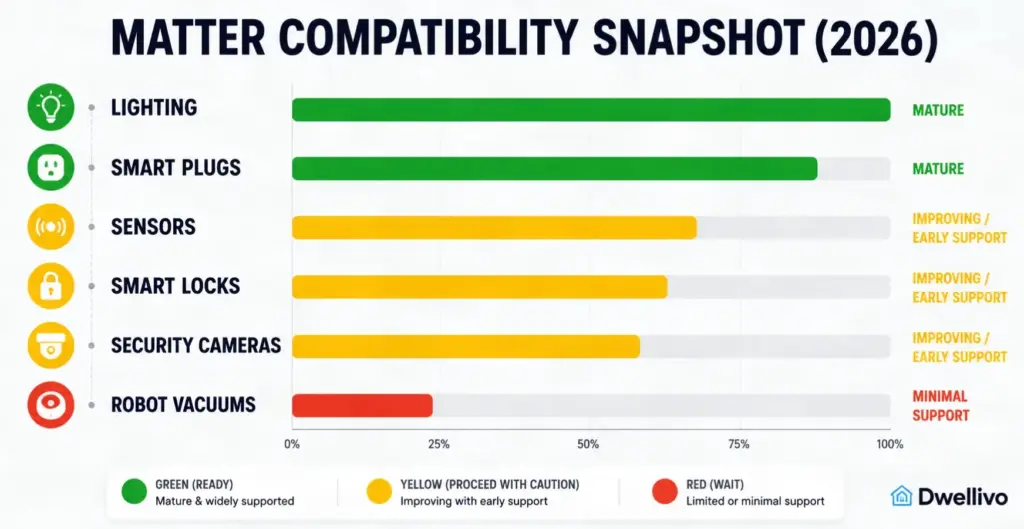
One caveat worth knowing: as of mid-2026, Matter’s camera support is still maturing. Some advanced features, like detailed robot vacuum room mapping or full energy monitoring, remain locked to individual manufacturer apps. Basic lighting, plugs, sensors, and locks are the most reliably cross-compatible categories right now.
15. Use a Smart Power Strip Instead of Multiple Smart Plugs
Once you own more than three or four smart plugs, a smart power strip becomes cheaper and tidier than a wall covered in bulky plug adapters.
A single strip with three or four individually controllable outlets lets you assign your TV, console, lamp, and phone charger to separate schedules from one device.
That matters in a studio, where every outlet is visible from the bed or couch.
16. Automate Temperature Around Your Sleep Schedule, Not the Whole Day
Most studios use a single window AC unit or the building’s shared HVAC. That means you’re heating or cooling one open room around the clock.
A smart plug or smart AC controller that only runs cooling during sleep hours, rather than all day, is one of the few automations that directly saves money in a studio. You’re paying to condition the same air whether you’re awake or asleep.
If your unit supports it, a Wi-Fi-enabled AC controller (an add-on remote sensor, not a built-in AC replacement) lets you set a target temperature that adjusts automatically as the room warms overnight.
You won’t need a smart thermostat wired into your wall. Most studios don’t have central HVAC wiring accessible for a wall-mounted thermostat anyway.
17. Use a Smart Doorbell Only If Your Building Allows It
Video doorbells are popular in house-focused guides, but most studio and apartment buildings restrict exterior door modifications, including doorbell replacement.
The door often belongs to a shared hallway system. Before buying one, check your lease specifically for doorbell or exterior hardware clauses.
If it’s allowed, look for battery-powered models with no-drill adhesive mounts rather than wired versions. Studio and apartment doors rarely have existing doorbell wiring exposed anyway.
18. Set Up Package and Delivery Alerts With a Door Sensor, Not a Camera
If a full camera feels excessive for a single door, a basic door sensor paired with a smart plug-controlled light can approximate the same function.
The instant your door opens, a light flashes or your phone buzzes, letting you know a delivery or visitor has arrived. No subscription camera plan needed.
This cheaper, more private alternative fits studios well, since a camera pointed at the door often captures your bed or kitchen in the frame too.
19. Group Devices by Function, Not Room, in Your App
Most smart home apps default to organizing devices by room, a layout built for houses.
In a studio, override this and group by function instead: “Sleep,” “Work,” “Cook,” “Away.” This single organizational choice makes voice commands and automations feel intuitive in a one-room apartment.
“Turn off the bedroom” doesn’t mean much if your bedroom and living room are the same four walls.
20. Keep a Manual Backup for Every Automated Device
Every smart device in a studio should have a manual fallback. You don’t have the luxury of a second light switch in another room if a hub goes offline.
Keep physical light switches accessible behind smart plugs rather than covering them. Keep a spare key for any retrofit smart lock. Avoid automations that fully replace your only way to control something.
For example, don’t remove a lamp’s manual switch just because it’s on a smart plug.
21. Plan for Move-Out Before You Plug In
The advantage of a studio-focused smart home is that almost everything you install can move with you.
Prioritize devices that unplug, peel off, or unscrew cleanly: smart plugs, adhesive-mounted locks, battery sensors, and screw-in bulbs. Avoid anything requiring wall cutouts or wired installation.
When you eventually move, your entire studio smart home setup should pack into one box and reinstall in the next apartment within an afternoon.
Common Studio Smart Home Mistakes to Avoid
- Buying room-based bundles. Multi-room starter kits often include devices you don’t need, like a second hub or redundant sensors, because they’re built for houses, not one-room apartments.
- Over-automating a single light source. If your studio has one overhead light, don’t split it across three different apps or triggers. Pick one automation and keep it simple.
- Ignoring lease language on adhesive mounts. “No drilling” doesn’t always mean “no restrictions.” Some leases restrict adhesive residue or weight limits on doors too.
- Skipping a Wi-Fi check before buying. A studio’s single router has to support every device in the room at once. Confirm your router handles enough simultaneous connections before buying a stack of Wi-Fi-only gadgets. Matter devices running over Thread reduce this load, since they use a separate low-power network instead of your main Wi-Fi.
Studio Smart Home Starter Kit at a Glance
| Lighting | Color-tunable smart bulbs + smart switch cover | Creates zones without walls |
| Lock | Adhesive retrofit smart lock | No drilling, original key still works |
| Power | Smart plugs (4-pack) or smart power strip | Turns any outlet into an automation point |
| Security | Battery indoor camera + door/window sensor | Covers one entry point without a monitored contract |
| Climate | Wi-Fi thermometer/humidity sensor + AC controller | Manages one shared airspace efficiently |
| Voice Control | One central smart speaker | Avoids overlapping wake-word zones |
FAQ smart home ideas for studio apartment
Do I need a smart hub for a studio apartment?
Not always. Many Wi-Fi smart plugs, bulbs, and cameras connect directly to your router without a separate hub. A hub becomes useful once you add Matter-over-Thread devices like certain locks and sensors, since those use a low-power mesh network instead of Wi-Fi.
Will smart home devices work if my studio has weak Wi-Fi?
Weak Wi-Fi affects Wi-Fi-based devices most. If your studio has thick walls or a router far from your unit, prioritize Matter and Thread-based sensors and locks, which rely less on your main Wi-Fi signal. Consider improving your apartment’s Wi-Fi first before adding many Wi-Fi-only devices.
Can I install a smart lock without my landlord’s permission?
Retrofit locks that replace only the interior thumb-turn and leave the exterior hardware untouched are the safest option, but permission requirements vary by lease and building. Always check your lease language and ask in writing before installing anything, even adhesive-only options.
How many smart plugs does a typical studio need?
Most studios cover their core lighting and appliance needs with four to six smart plugs. That’s usually enough for a bedside lamp, desk lamp, TV and console, and one kitchen appliance, with a couple spare for seasonal items like a fan or heater.
Is a smart home worth it in a small apartment?
For studios specifically, yes, because the same device often does more work. One smart plug schedule, one lighting scene, and one voice group can manage an entire living space. That makes the cost-to-benefit ratio better than in a large house, where you’d need many more devices to get similar coverage.
Final Takeaway
A studio apartment doesn’t need a scaled-down version of a house’s smart home setup.
It needs a different one, built around zones instead of rooms, plug-in automation instead of wiring, and devices that leave your lease exactly as you found it.
Start with lighting zones and a retrofit lock. Add smart plugs as you notice repeat routines. Resist the urge to buy anything that needs a drill or a dedicated equipment closet you don’t have.
For more on getting your studio’s Wi-Fi ready to support all of this, see our guide to improving Wi-Fi in an apartment, or explore our full smart home category for renter-focused setups beyond the studio.