
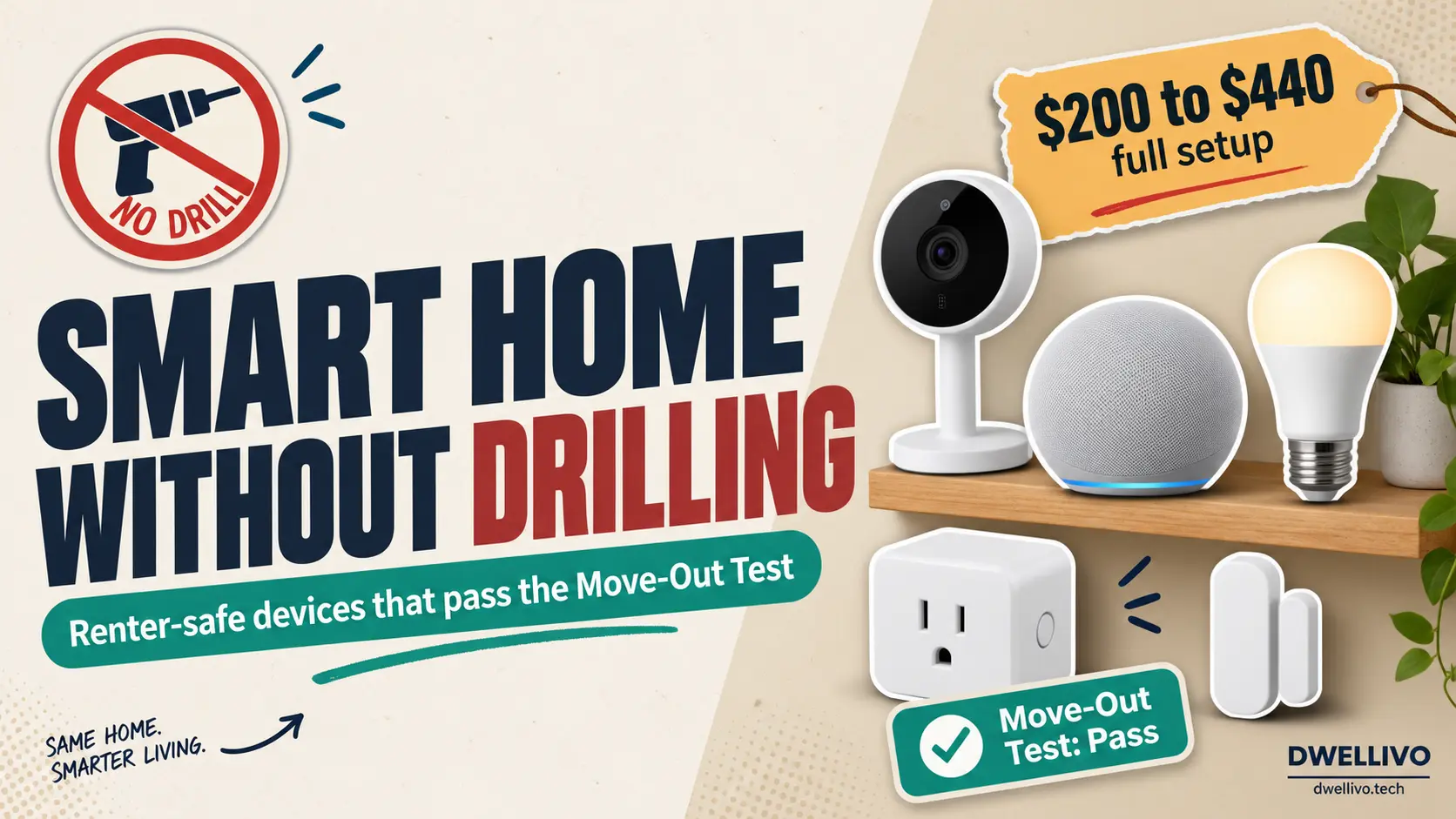
Your lease says no drilling. Your landlord says no modifications. Your security deposit says please be careful. But you still want a home that responds to your voice, adjusts its lighting, and alerts you when someone is at the door.
The good news is that the smart home market has shifted dramatically over the past few years.
More devices now work right out of the box with nothing more than a power outlet, a strip of adhesive, or a flat surface. You can build a genuinely useful smart home without making a single permanent change to your space.
This guide covers every major category of smart home devices without permanent installation.
We organized it by installation method rather than device type because the installation method protects your walls and your deposit.
We also flag the devices that look easy to install but secretly require drilling or wiring so they don’t catch you off guard.
The Quick Answer
The most reliable smart home devices without permanent installation fall into four groups: plug-in devices like smart plugs and smart bulbs, adhesive-mount devices like motion sensors and indoor cameras, freestanding devices like robot vacuums and smart speakers, and magnetic-mount devices like door and window sensors. Together, these four groups cover lighting, security, climate monitoring, entertainment, and automation.
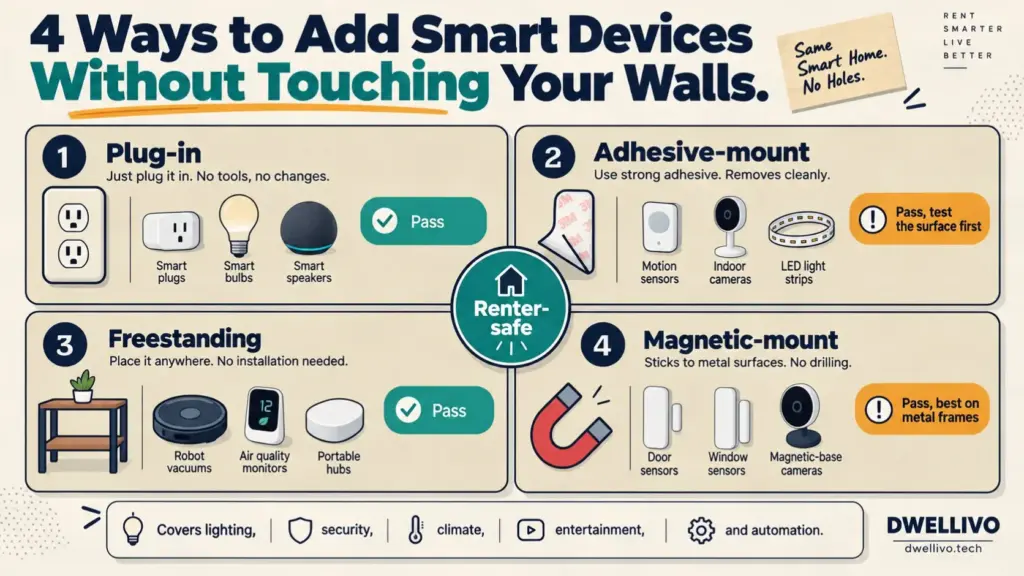
You can build a complete system without picking up a drill.
The Move-Out Test: A Simple Framework
Most smart home articles hand you a list of products and call it a day. We believe that this approach overlooks the more important question. The question is not “Can I install a smart home device?” But “Can I remove this without leaving a trace?”
From Dwellivo’s perspective, every device in a rental should pass what we call the Move-Out Test. A device passes if it meets three conditions:
- You can remove it in under five minutes.
- It leaves zero visible damage to walls, surfaces, or wiring.
- You can pack it up and take it to your next home.
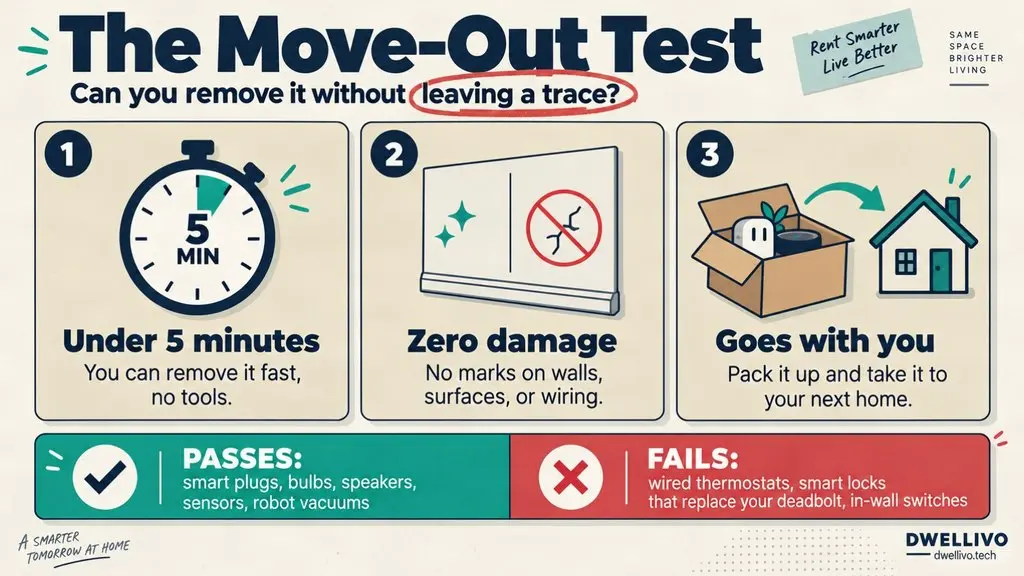
This framework rules out many devices that other guides recommend. A wired smart thermostat might technically be “easy to install” if you already have a C-wire, but it fails the Move-Out Test. You would need to disconnect wiring and deal with the original thermostat your landlord expects to find on the wall.
Use the Move-Out Test as your filter for every purchase. If a device requires screws, anchors, hardwiring, or permanent adhesive that damages paint, it does not belong in a rental setup.
Plug-In Devices: The Easiest Starting Point
Plug-in devices are the foundation of any non-permanent smart home. They connect to a standard electrical outlet and communicate over Wi-Fi, Bluetooth, or a hub-based protocol. No tools required.
Smart Plugs
Smart plugs are the single most useful device for renters. Plug one into an outlet, plug a lamp or fan into the smart plug, and that dumb device becomes voice-controlled and schedulable.
Current models from brands like TP-Link Kasa, Amazon Smart Plug, and Eve Energy are compact enough that they do not block adjacent outlets.
Most connect directly to Wi-Fi, so you do not need a separate hub. Some newer models support Matter, the cross-platform smart home standard developed by the Connectivity Standards Alliance (CSA), which improves compatibility across Apple, Google, and Amazon ecosystems.
Best for: Lamps, fans, coffee makers, space heaters, and any device with a simple on/off switch.
Move-Out Test result: Pass. Unplug and pack.
Smart Bulbs
Smart bulbs screw into existing light fixtures just like regular bulbs, with no modification to the fixture. Brands like Philips Hue, WiZ, and Sengled offer bulbs that range from simple white dimming to full color changing.
One important detail: smart bulbs need constant power to stay connected. If someone flips the wall switch off, the bulb goes offline, which can frustrate you in a shared apartment.
We think smart bulbs work best in lamps and fixtures where the wall switch stays on or in rooms where you are the only person using the lights. For overhead fixtures in shared spaces, a smart plug controlling a lamp is often more practical.
Best for: Bedside lamps, desk lamps, and accent lighting.
Move-Out Test result: Pass. Unscrew and pack.
Smart Speakers and Displays
Devices like the Amazon Echo, Google Nest Audio, and Apple HomePod Mini sit on a shelf or countertop and plug into an outlet.
They serve as voice assistants, music players, and smart home controllers. No mounting required.
Best for: Voice control, music, and acting as a central hub for your other devices.
Move-Out Test result: Pass. Unplug and pack.
Adhesive-Mount Devices: Sticking Without Damaging
Adhesive mounting is where things get tricky. Many devices come with adhesive strips, but not all adhesive is created equal. The key distinction is between removable mounting tape and permanent adhesive.
Indoor Security Cameras
Most compact indoor cameras from brands like Wyze, Blink Mini, and Ring Indoor Cam come with a small adhesive disc or a flat base that sits on a shelf.
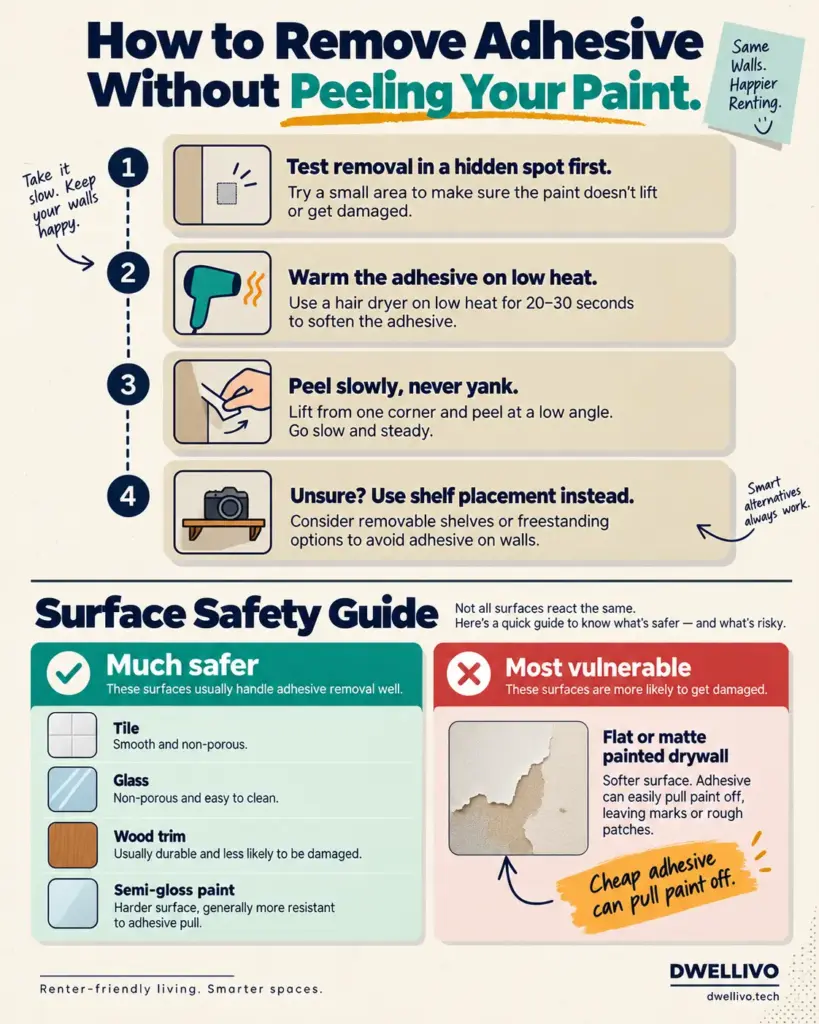
The adhesive disc is usually sufficient for lightweight cameras, and gentle heat from a hair dryer plus slow peeling removes it cleanly.
For renters, we recommend shelf or flat-surface placement whenever possible instead of the adhesive mount. A camera on a bookshelf or kitchen cabinet works just as well as one stuck to the wall, and it eliminates any risk of paint damage.
If you do use adhesive, apply it to a surface you can easily clean, like tile or glass, rather than painted drywall.
Best for: Monitoring common areas, pet cameras, and baby monitors.
Move-Out Test result: Pass with caution. Shelf placement is safer than adhesive on painted walls.
Motion and Environmental Sensors
Small motion, temperature, and humidity sensors often weigh less than two ounces. Their adhesive backing is usually gentle enough to remove cleanly, especially from smooth surfaces.
Brands like Aqara, Eve, and SwitchBot make compact sensors that stick to walls, door frames, or shelves. Because they are so light, they put minimal stress on your paint. Still, if you worry about your specific wall finish, test removal in an inconspicuous spot first.
Best for: Automating lights, monitoring room temperature, and triggering routines when you enter a room.
Move-Out Test result: Pass. Low risk due to minimal weight.
LED Light Strips
LED light strips attach with adhesive backing to surfaces like the back of a TV, the underside of kitchen cabinets, or baseboards. Most strips use a 3M-style adhesive that you can remove with heat and patience.
The main risk is that cheap adhesive can pull paint off drywall during removal. We recommend buying strips from established brands that use higher-quality adhesive and applying them to non-painted surfaces like wood trim, metal, or glass whenever possible. If you must apply them to painted walls, soften the adhesive with a hair dryer on low heat before peeling.
Best for: Ambient lighting behind TVs, under cabinets, and along shelving.
Move-Out Test result: Conditional pass. Safe on non-painted surfaces. Risky on flat paint.
Freestanding and Portable Devices: Zero Contact With Walls
Freestanding devices do not touch your walls at all. They sit on the floor, a table, or a countertop, which makes them the safest category for renters.
Robot Vacuums
Robot vacuums from iRobot, Roborock, and Eufy navigate your floors autonomously and return to a charging dock that plugs into a standard outlet.
They need no installation of any kind. Set the dock against a wall and let the robot do its work.
Best for: Daily floor maintenance in apartments of any size.
Move-Out Test result: Pass. Pick up the dock and go.
Smart Air Quality Monitors
Devices like the Airthings View Plus or the Awair Element sit on a desk or shelf and monitor indoor air quality, including particulate matter, CO₂ levels, and volatile organic compounds.
They plug into an outlet or run on batteries. According to the EPA, indoor air quality can be significantly worse than outdoor air, which makes these devices genuinely useful in older apartments with poor ventilation.
Best for: Older apartments, rooms with limited airflow, and anyone with allergies.
Move-Out Test result: Pass. Unplug and pack.
Portable Smart Displays and Hubs
Some smart home hubs, like the Samsung SmartThings Station, are small enough to sit on a nightstand. They control your other devices and can double as wireless chargers. No mounting, no wiring.
Best for: Centralizing control of your smart home devices.
Move-Out Test result: Pass.
Magnetic-Mount Devices: Clean and Reversible
Magnetic mounting is one of the most renter-friendly installation methods available. A small metal plate attaches to a surface with gentle adhesive, and the device snaps onto the magnet. Removal is clean and fast.
Door and Window Sensors
Most contact sensors from brands like Ring, Aqara, and Wyze use a two-piece design. One piece goes on the door or window frame, and the other goes on the door or window itself. Many include both adhesive and magnetic mounting options. The magnetic option is ideal for metal door frames, which are common in apartment buildings.
Best for: Security alerts, automation triggers, and knowing whether a window is open.
Move-Out Test result: Pass. Magnetic mounts leave no residue on metal surfaces.
Some Indoor Cameras
Certain camera models include a magnetic base that attaches to a metal surface or a small metal disc you can place anywhere. This gives you flexible positioning without committing to a wall mount.
Best for: Flexible camera placement in rooms with metal shelving or appliances.
Move-Out Test result: Pass.
The Hidden Permanent Installation Traps
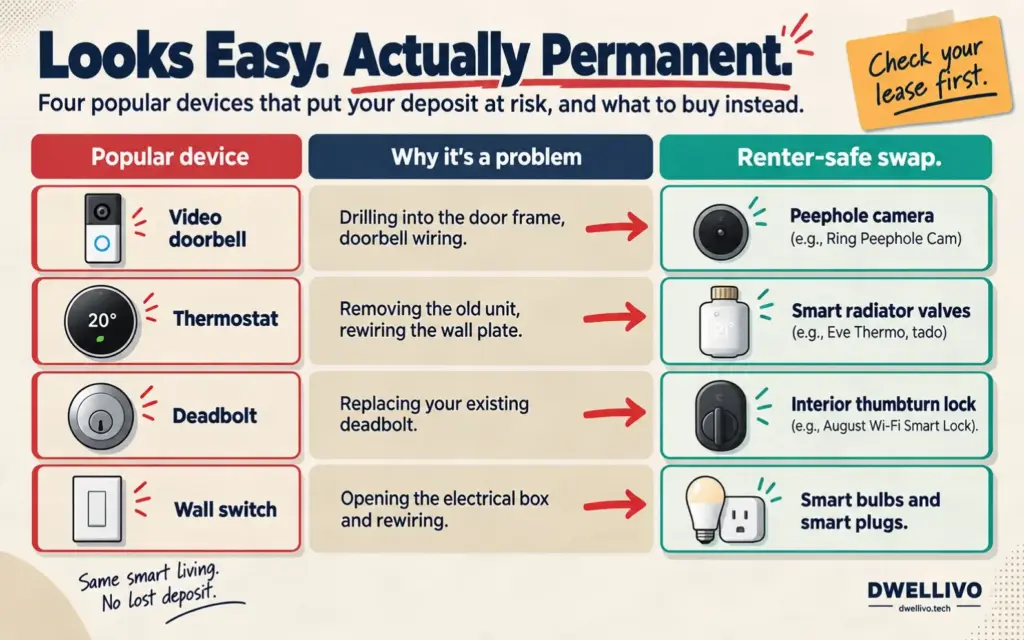
This is the section most guides skip, and it is where renters get into trouble. Several popular smart home devices are marketed as “easy to install” but require permanent modifications.
Video Doorbells
Most wired video doorbells require you to drill into your door frame and connect to existing doorbell wiring.
Even battery-powered models like the Ring Video Doorbell typically need screws or security mounts drilled into the wall. In an apartment, you may not even have your own exterior door to mount one on.
Renter-safe alternative: A peephole camera like the Ring Peephole Cam replaces your existing door peephole without drilling.
It is removable and leaves the original peephole intact. Check your lease before modifying even the peephole, though.
Smart Thermostats
Smart thermostats like the Ecobee or Nest Learning Thermostat require you to remove your existing thermostat and rewire the wall plate. This involves handling low-voltage wiring and may leave visible marks or holes when you reinstall the original unit. Many landlords also consider the thermostat part of the building’s HVAC system and do not want tenants replacing it.
Renters’ safe alternative: Smart radiator valves like the Eve Thermo or Tado Smart Radiator The thermostat is attached directly to individual radiators without any wiring. They are common in older apartment buildings with radiator heating, and you can remove them when you move out.
Smart Locks
Most smart locks replace your existing deadbolt, which means removing the original lock hardware. Even models that claim to install “over” your existing lock may not fit every door configuration. Landlords almost universally require the original lock to remain in place.
Renter-safe alternative: Some smart locks, like the August Wi-Fi Smart Lock, attach to the interior thumbturn of your existing deadbolt without replacing the exterior hardware. The outside of your door looks unchanged, and your landlord’s key still works. Confirm compatibility with your specific deadbolt before purchasing.
Hardwired Smart Lighting
Smart light switches and in-wall dimmers require you to open the electrical box and rewire the switch. This is permanent, potentially dangerous if done incorrectly, and almost certainly a lease violation.
Renter-safe alternative: Smart bulbs and smart plugs give you the same lighting control without touching the wiring.
Building a Complete System Without a Single Screw
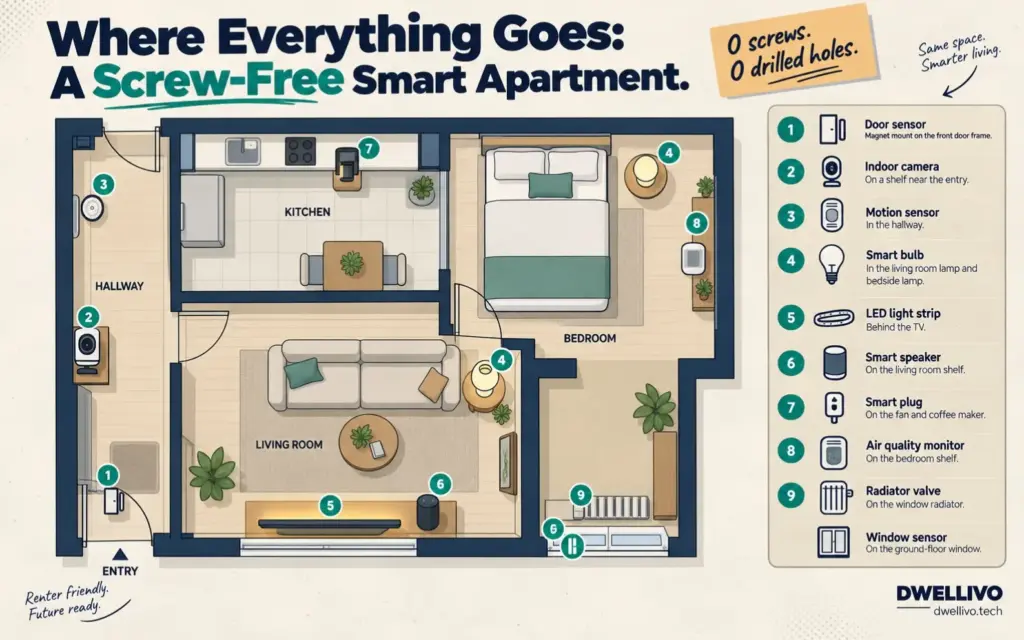
At Dwellivo, we believe a functional smart home does not require dozens of devices. A small, well-chosen setup covers most needs. Here is a practical system you can build entirely with non-permanent devices:
- Lighting: Two to four smart bulbs in your most-used lamps, plus an LED light strip behind your TV. Total cost is roughly $40 to $80.
- Security: One indoor camera on a shelf near your entry point, plus two door and window sensors on your front door and a ground-floor window. Total cost is roughly $50 to $90.
- Climate: One smart air quality monitor and, if you have radiators, one or two smart radiator valves. Total cost is roughly $50 to $120.
- Automation: Two smart plugs for your fan and coffee maker, plus a motion sensor in your hallway to trigger lights automatically. The total cost is roughly $30 to $50.
- Control: One smart speaker or display as your central hub. Total cost is roughly $30 to $100.
Total system cost falls between $200 and $440, depending on the brands you choose. Every device in this setup passes the move-out test. You can assemble it in an afternoon and pack it into a couple of boxes when your lease ends.
For more on smart lighting, read our guide on apartment-friendly smart lighting.
The Deposit-Safe Checklist
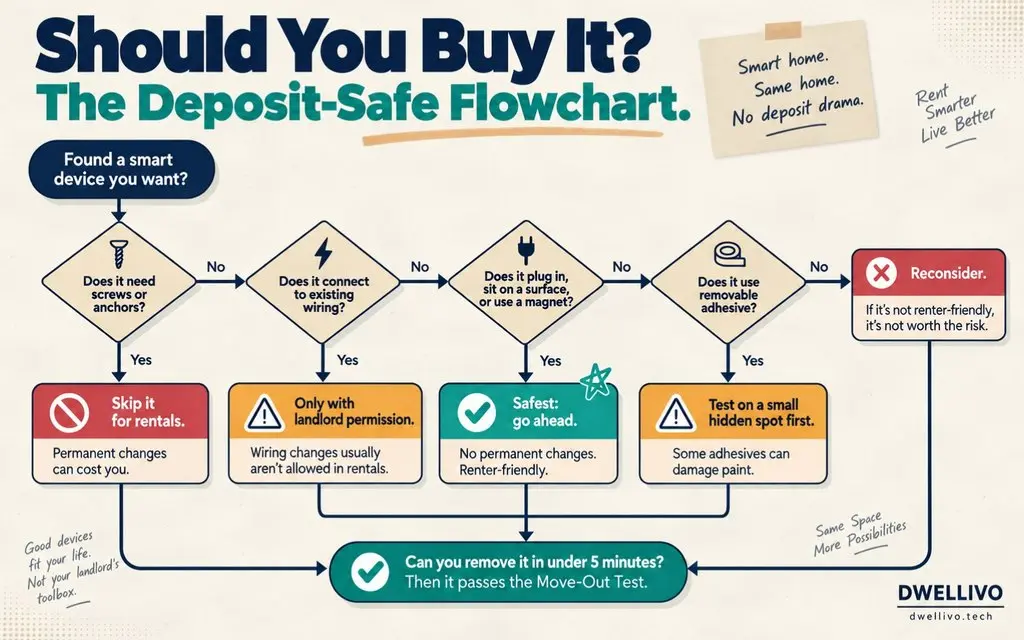
Before buying any smart home device for a rental, run it through this quick checklist:
Does it plug into a standard outlet? Likely safe. Check other installation methods. Does it require screws or anchors?
Avoid rentals. Proceed. Does it connect to existing wiring? Avoid unless you have landlord permission. Proceed. Does it use removable adhesive?
Safe on most surfaces Test on a small area first. Does it sit on a flat surface? Safest option: Proceed. Can you remove it in under five minutes? Passes the Move-Out Test Reconsider Will it leave marks on painted drywall? Use shelf placement instead.
Frequently Asked Questions
Can I use smart home devices in an older apartment with limited outlets?
Yes, but you may need to prioritize. Start with a smart power strip that gives you multiple smart-controlled outlets from a single wall plug. Focus on the devices that solve your biggest problems first, such as a smart plug for a space heater or a smart bulb for a dark corner.
Do smart home devices without permanent installation work with Alexa, Google Home, and Apple HomeKit?
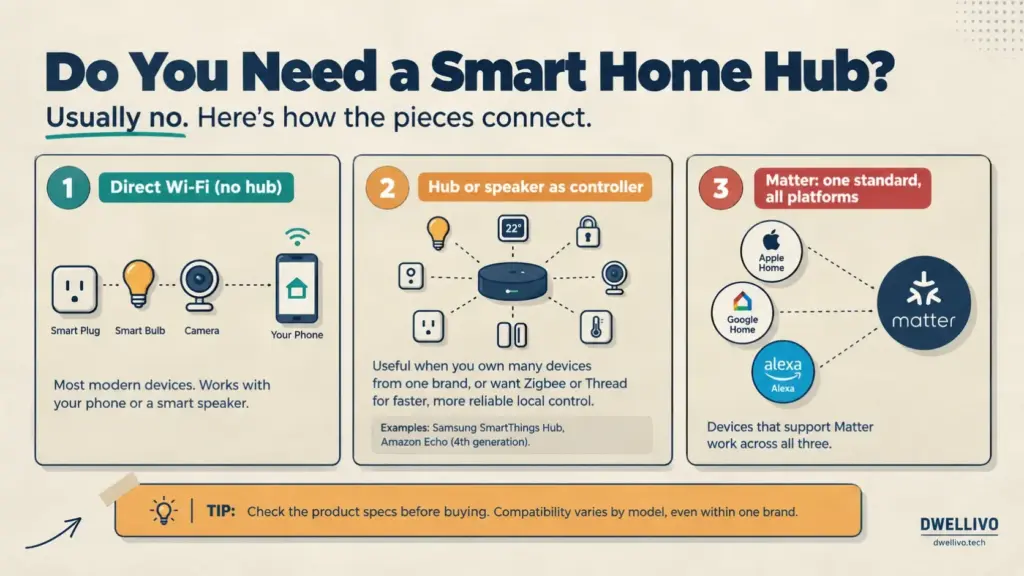
Most do. Look for devices that list compatibility with your preferred platform on the packaging. Devices that support the Matter standard work across all three major ecosystems. Check the product specifications before purchasing, because compatibility varies by model, even within the same brand.
Will adhesive-mounted devices damage my walls when I remove them?
It depends on the wall surface and the adhesive quality. Painted drywall with flat or matte paint is the most vulnerable. Semi-gloss paint, tile, glass, and wood trim are much safer. Remove the adhesive slowly, and soften it first with a hair dryer on low heat. If you are unsure, choose shelf or freestanding placement instead.
Can I take my smart home devices with me when I move?
Yes. That is the entire point of choosing non-permanent devices. You can pack up and reinstall every device in this guide in a new space. Keep the original packaging and mounting accessories in a box so you have everything you need for the next apartment.
Do I need a smart home hub?
Not necessarily. Many modern devices connect directly to Wi-Fi and work with your phone or a smart speaker. A dedicated hub becomes useful when you own many devices from the same brand or want Zigbee or Thread protocols for faster, more reliable local control. The Samsung SmartThings Hub and the Amazon Echo (4th generation) both include built-in hub functionality.
Final Takeaway
Building a smart home without permanent installation is no longer a compromise. Today’s devices are capable, affordable, and genuinely portable.
Think about the installation method first and the device features second.
If it plugs in, sticks on with removable adhesive, sits on a shelf, or snaps onto a magnet, it probably belongs in your rental. If it requires a drill, a screwdriver, or a wire stripper, save it for when you own the place.
Start small. Pick the two or three problems that bother you most in your current space, and solve those first. You can always add more devices later, and every device you choose will come with you to your next home.
Explore more renter-friendly setup ideas in our smart home guides for apartments. If connectivity is a problem in a small space, our guide on improving Wi-Fi in an apartment covers solutions that also require zero permanent changes.